Edit general information (name, email address, and address)
1. Click on the top left corner where the name of your accommodation is located, next to which the first letter of the accommodation is written in a large circle.
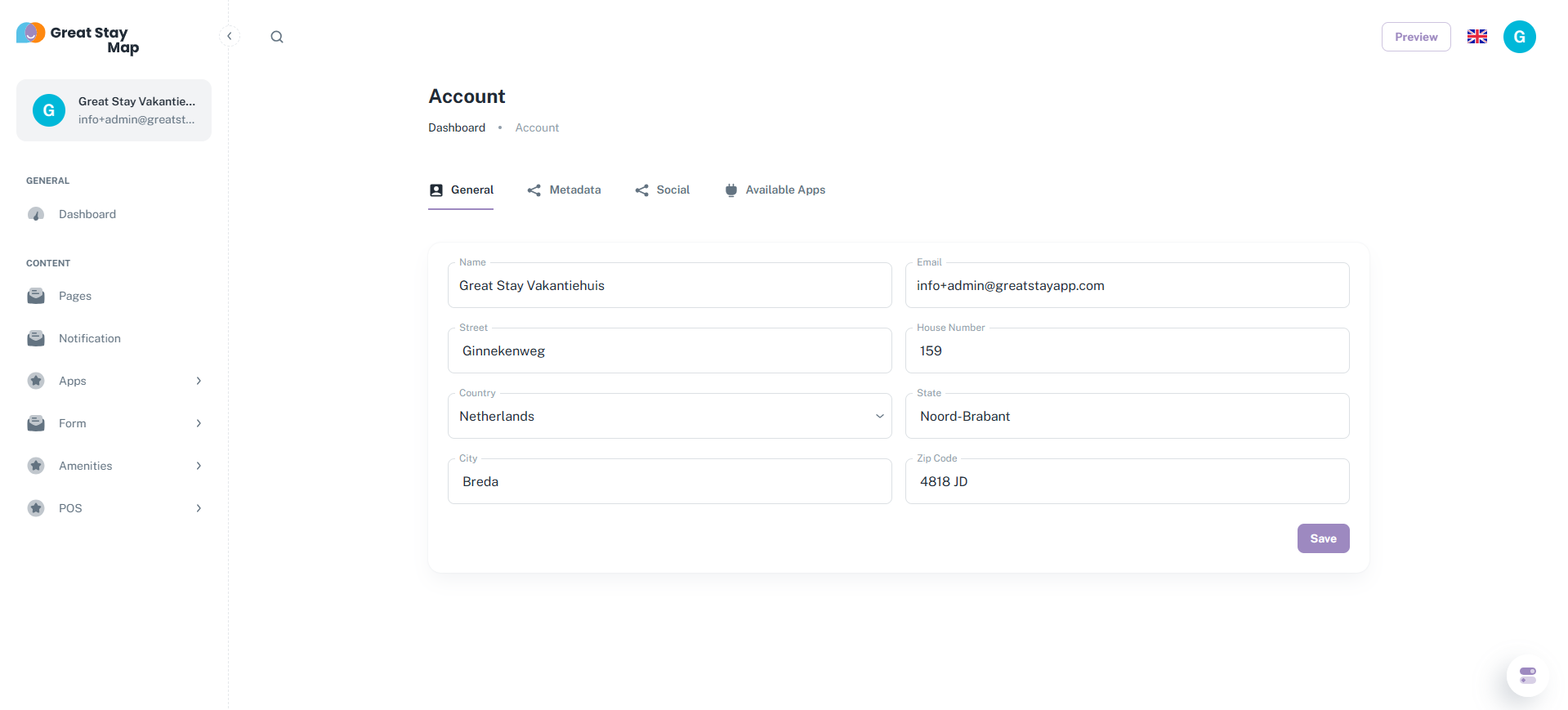
2. Under "General," edit the name of the accommodation, your email address, and the address.
3. Note! Once you've edited something here, you must enter a blank space. If you want to leave something blank, just enter a space.
Under "General Information," you can edit the name of your accommodation, your email address, and add all the address information. Above each box, you'll also find the information types you can enter. You don't necessarily have to follow these; you can also access other information by adding other information. This is a matter of testing. Note! Once you enter something, you must enter a blank space to save it. If you don't want to enter anything, we recommend just entering a space. The system will then interpret the space as text, allowing you to save the data. The address will be visible at the bottom of the web app. Your email address will not be visible.
Below you can see what this looks like in the CMS:
Is anything unclear or do you have any other questions/comments? Send us an email at office@greatstayapp.com, fill in our enquiry form or call us on +31 (0)85 40 15 336.
Was this article helpful?
That’s Great!
Thank you for your feedback
Sorry! We couldn't be helpful
Thank you for your feedback
Feedback sent
We appreciate your effort and will try to fix the article