 |  |
There are various building blocks available to supplement your app. Within your app, these are the pages. Each building block has its own functionality. Some building blocks specialise in displaying information, while others are more focused on interaction with end users.
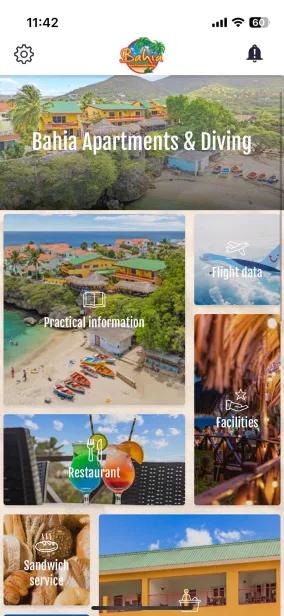
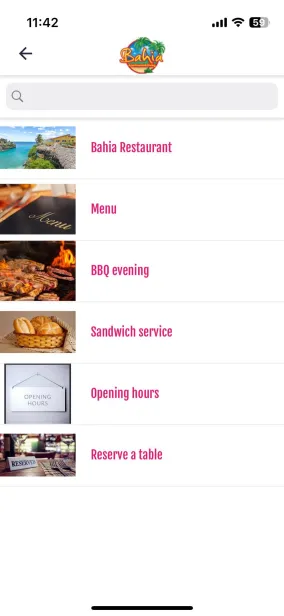
In the image above, all the buttons on the left-hand side ("Practical information", "Facilities", etc.) are building blocks, and the image on the right-hand side is an example of a list building block (under “Restaurant”, a list is displayed containing all kinds of information about the restaurant).
All building blocks
Generic content
These building blocks make it easy to place important information in the app.Deze bouwstenen maken het eenvoudig om belangrijke informatie in de app te plaatsen.
| Building block | Description |
|---|---|
| List | Display a list of articles or PDF documents. |
| Single page | A single page with information. |
| News | Share general news items with your guests and send a push notification directly from the news item. |
| Webview | Open een webpage directly in the app. |
| Webview list | A list of web pages. |
| Contact | An overview of all contact details and a map showing the location of your accommodation. |
Communication
These building blocks help you communicate with your guests.
| Building block | Description |
|---|---|
| Form | Opens a form directly. |
| Form list | Views a list of different forms. |
| Notice board | Post messages to share fun events or news with groups of guests. |
Additional functionality
These building blocks provide your app with more extensive functionalities.
| Building block | Description |
|---|---|
| Events | Indicate when specific events are taking place, such as an Easter brunch or a variety show. |
| Photos | A collection of photo albums. Sorted by group. |
| Videos | YouTube and Vimeo videos fully integrated into the app. |
- Modify building blocks
You can only change the name of the app's building blocks (press the blue dots with dashes next to “Content,” then press the blue squares on the right side  of the desired page to edit the title), not the type of building block. Please contact us if you want to change the building blocks.
If you want to add a new building block, please briefly indicate what type of building block you want (e.g., list, events, contact page, etc.). To change or add building blocks, send an email to david@greatstayapp.com.
Is anything unclear or do you have any other questions/comments? Send us an email at office@greatstayapp.com , fill in our enquiry form or call us on +31 (0)85 40 15 336.
Was this article helpful?
That’s Great!
Thank you for your feedback
Sorry! We couldn't be helpful
Thank you for your feedback
Feedback sent
We appreciate your effort and will try to fix the article