Categories are necessary for adding amenities. They are also very useful, as they allow you to filter your tips! This is handy for giving restaurants and hospitals a different coloured pin...
1. Tap Amenities at the bottom left
2. Tap ‘All Categories’
3. Tap the purple button at the top right +New Category
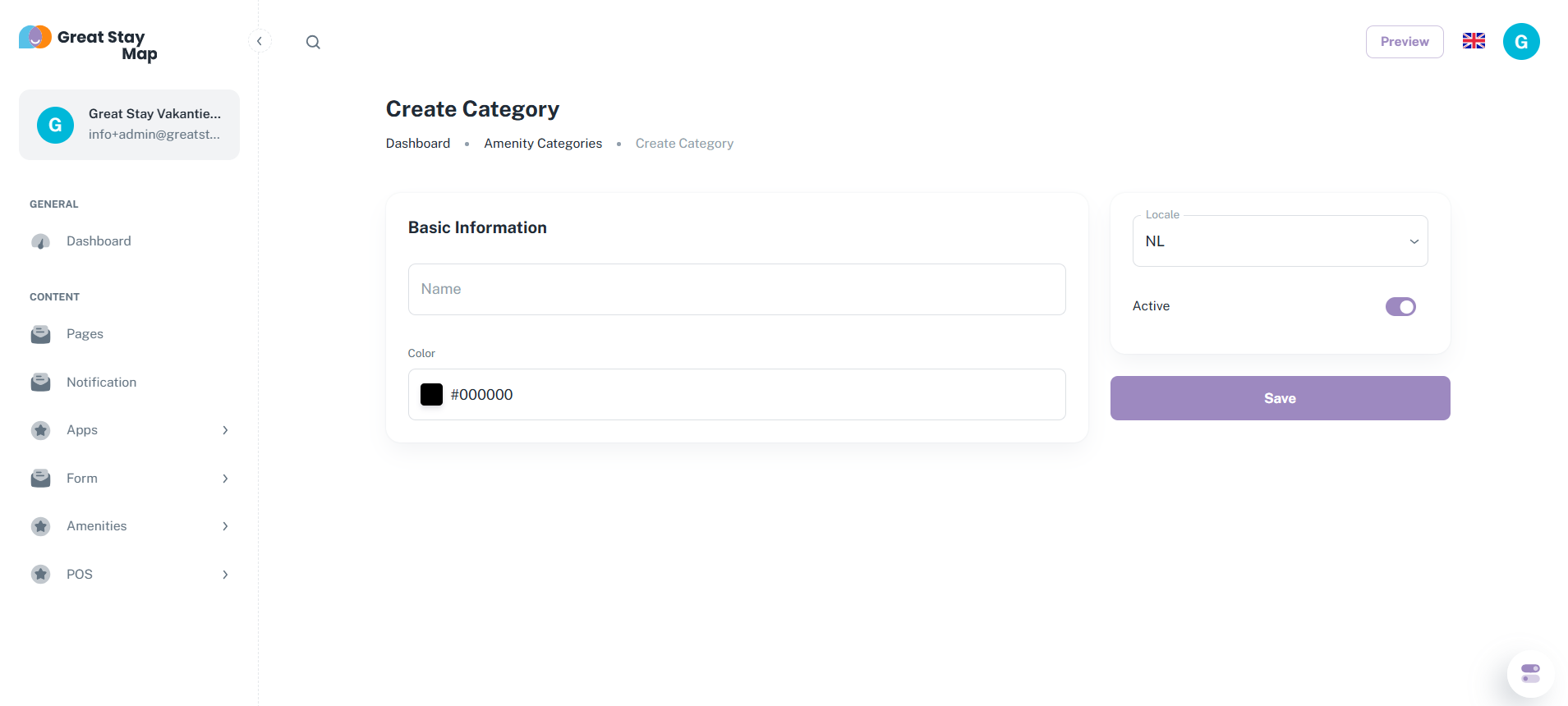
4. Enter a name for the category
5. Choose a colour for the category. You can do this by entering a colour code or by opening the colour menu when you tap the black square.
6. Tap the purple Save button in the centre right
This is what it looks like when you create a category
Add as many categories as you like! Our tip: add a maximum of 10 to keep things organised.
Don't know your hexadecimal colour code? No problem! Here's how to find out:
1. Go to https://imagecolorpicker.com
2. Scroll down and press ‘Use your image’
3. Upload the image from which you want to extract the colour
4. Press the spot in the image where you want to extract the colour, and the colour code will appear below the image
Is anything unclear or do you have any other questions/comments? Send us an email at office@greatstayapp.com, fill in our enquiry form or call us on +31 (0)85 40 15 336.
Was this article helpful?
That’s Great!
Thank you for your feedback
Sorry! We couldn't be helpful
Thank you for your feedback
Feedback sent
We appreciate your effort and will try to fix the article