Once you have created categories, it is finally time to add your own tips (facilities)!
1. Make sure you have created a category. See here how to do this.
2. Click on Facilities at the bottom left.
3. Click on ‘All Facilities’.
4. Click on the purple button ‘+ New Facility’ at the top right.
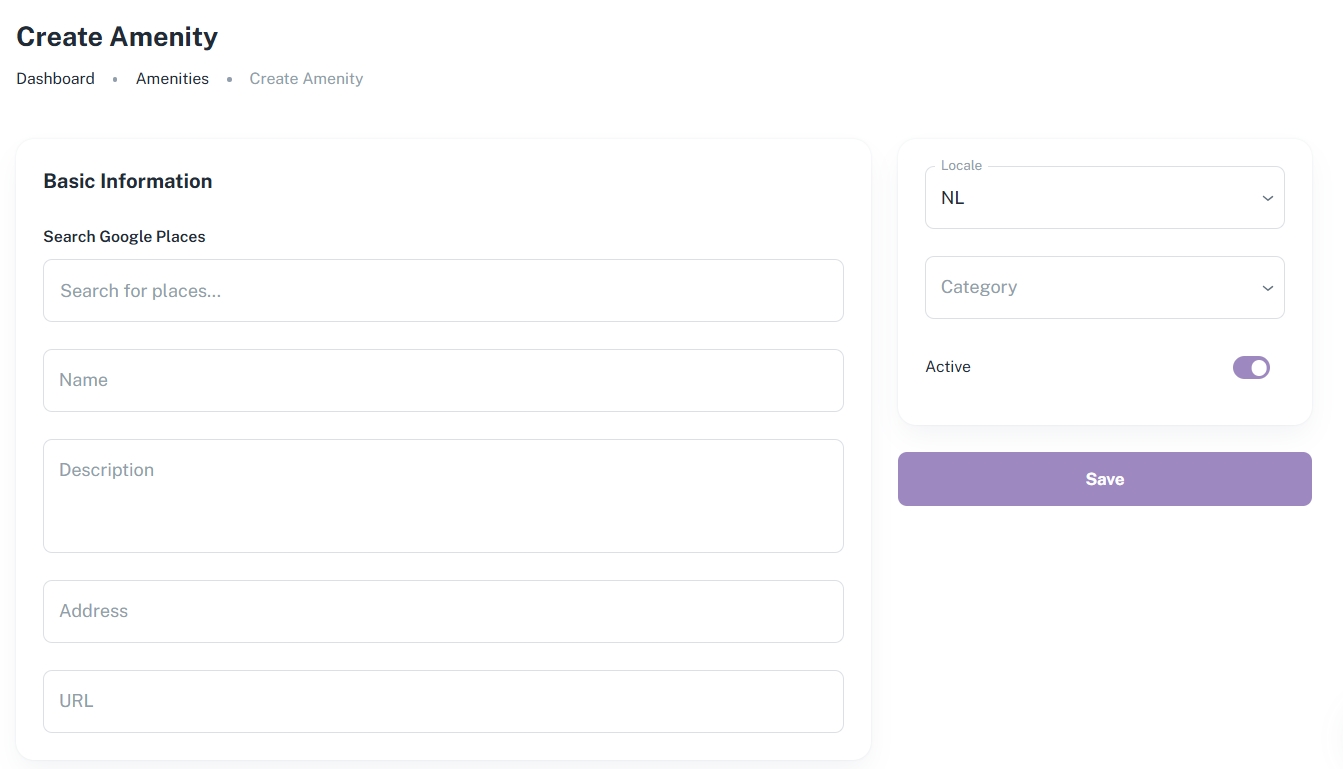
5. You can now add the details of your tips. There are two ways to do this:
5.1 Google Places
You can use Google Places. Type the name of the facility under the heading “Google Places” and then click on the correct suggestion. All the information except for a description will then be filled in automatically. The CMS does not display a URL, but you can view it once the facility has been created. Have you entered your tip, but it does not appear as a suggestion? Search for your tip on Google and copy the name that Google gives it.
5.2 Manual entry
If your address does not exist on Google Places, or if you prefer to fill in all the details yourself, you can do so. Enter the name of the tip in the “Name” field, a short description (max. 2 sentences) in the “Description” field, the address in the “Address” field and the internet link in the “URL” field.
6. Click on Category and select the category you want to link to the facility.
7. Click on the purple Save button. Please note: if you have not linked a category, you will not be able to save the facility.
Is anything unclear or do you have any other questions/comments? Send us an email at office@greatstayapp.com, fill in our enquiry form or call us on +31 (0)85 40 15 336.
Was this article helpful?
That’s Great!
Thank you for your feedback
Sorry! We couldn't be helpful
Thank you for your feedback
Feedback sent
We appreciate your effort and will try to fix the article