Sometimes you create a page that you ultimately no longer need or that is no longer relevant. But how do you delete it correctly?
1. Click on “Pages” on the left-hand side.
2. Click on the three dots next to the page you want to delete, then click on “Delete”.
3. Please note! Do not press the red button immediately. First, tick ‘Delete for all languages’, as shown in the screenshot below.
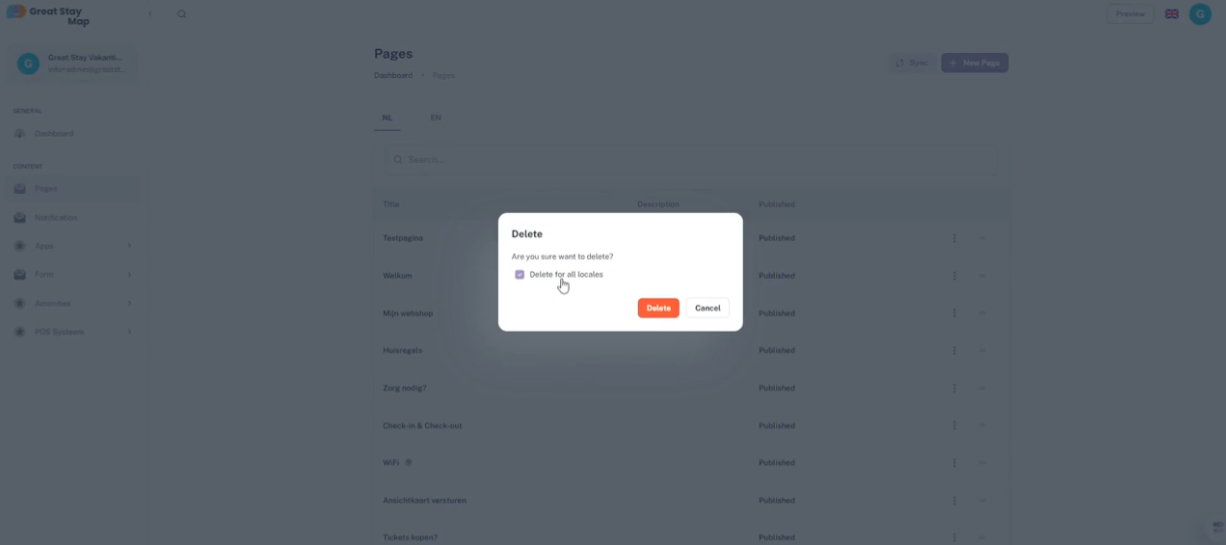
4. Press the red delete button.
Did you forget to tick ‘Delete for all languages’? Then the page still exists in all other languages. Do you want to delete the page there too?
5. Press a language abbreviation for another language (NL = Dutch, EN = English, FR = French, DE = German and ES = Spanish).
6. Find the page and follow steps 2 and 3. If you follow step 3 correctly, you will not need to repeat this process for the other languages.
Is anything unclear or do you have any other questions/comments? Send us an email at office@greatstayapp.com, fill in our enquiry form or call us on +31 (0)85 40 15 336.
Was this article helpful?
That’s Great!
Thank you for your feedback
Sorry! We couldn't be helpful
Thank you for your feedback
Feedback sent
We appreciate your effort and will try to fix the article